ContactOut Pricing: Plans, Costs and Credit Breakdown [2026]
ContactOut is a sales intelligence platform designed to help users find accurate personal and business email addresses and phone numbers of professionals. It provides access to a large database with over 300 million professionals and 40 million companies. This platform offers additional features like a strong search portal with over 20 data filters.
The pricing plans of ContactOut are Free, Email, Email+Phone, and Team/API. The Free plan costs $0, the Email plan costs $99 per month, Email+Phone costs $199 per month, and Team/API offers customized pricing according to user needs.
The pricing of Exact Data varies across four plans, such as Free, Email, Email+Phone, and Team/API, based on features and usage needs. The Free plan includes a browser extension, search portal, and a limited trial of premium tools. The Email plan costs $99 per month, adds email campaigns and a list builder, perfect for solo users. The Email+Phone plan, priced at $199 per month, improves capabilities with data enrichment, AI Email Writer, and broader data coverage. The Team/API plan offers customized pricing with access to over 700 million profiles, Salesforce and ATS integrations, advanced team management, and a dedicated account manager, which is ideal for larger teams handling full-scale operations.
What are the pricing plans of ContactOut?
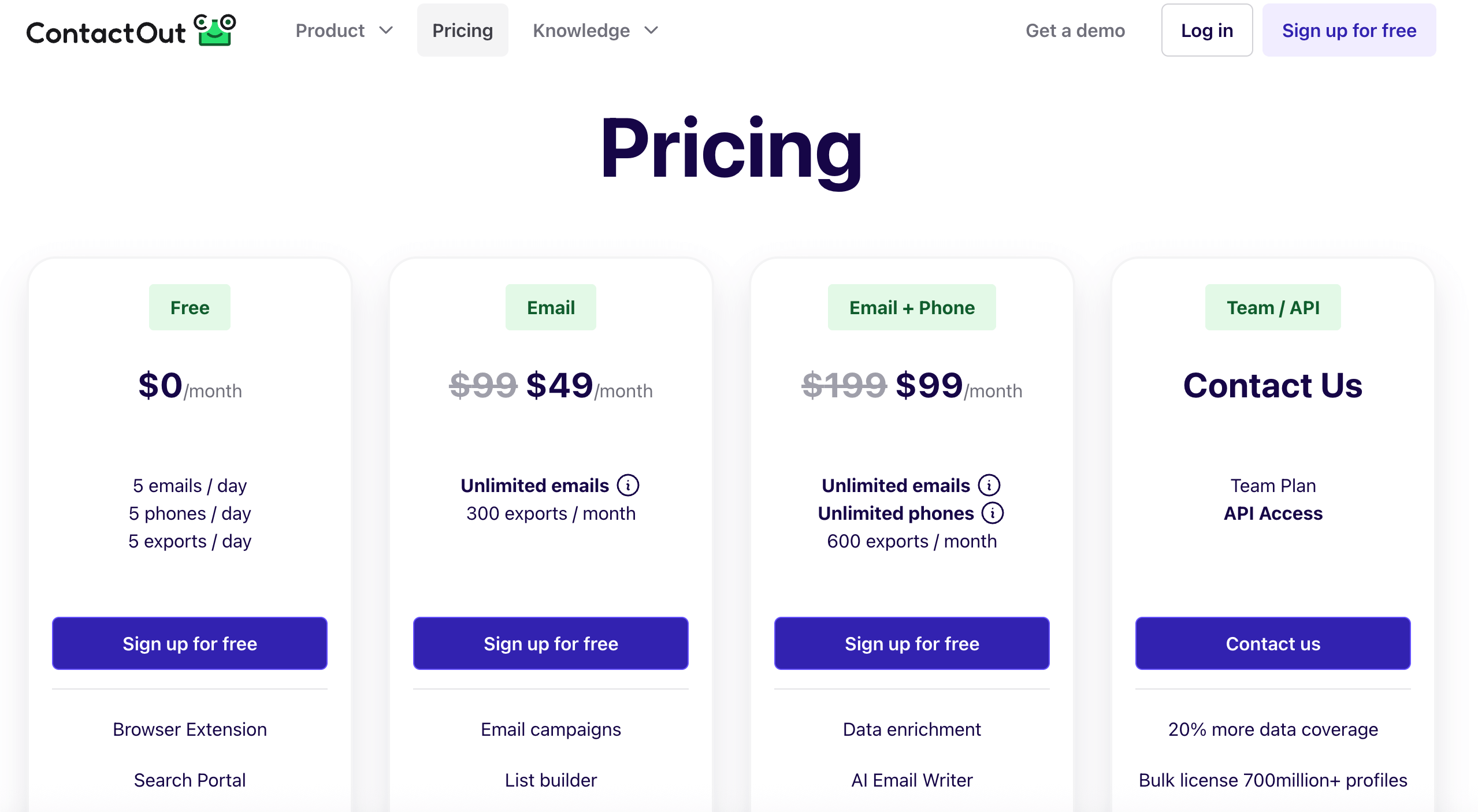
The pricing plans of ContactOut include Free, Email, Email+Phone, and Team/API. Each of the pricing plans offers a unique feature.
Free
ContactOut offers a free plan that provides users with access to five emails, five phone numbers, and five exports per day at no cost. This plan includes a browser extension and a search portal, which allows users to find contact information easily. It also gives a trial of premium features with a limit of one user per company.
Best for: Individuals who require basic contact-finding capabilities without any monthly charges.
ContactOut offers an email plan that costs $99/month and offers unlimited emails along with 300 exports per month. Users have the option to sign up for free and gain access to features such as email campaigns and a list builder. This plan also includes everything from the Free plan and is limited to one user per company. The plan that includes US/UK data costs $99 per month.
Best for: Individuals or small teams focused on expanding their email outreach capabilities
Email+Phone
ContactOut’s Email+Phone plan costs $199/month and includes unlimited emails and unlimited phone numbers with 600 exports per month. This plan also offers additional features such as data enrichment and an AI Email Writer. It is limited to one user per company and contains all features found in the Email plan. The Email+Phone pricing plan that includes the US/UK data costs $99 per month.
Best for: Users who need both email and phone contact data, with advanced outreach tools
Team/API
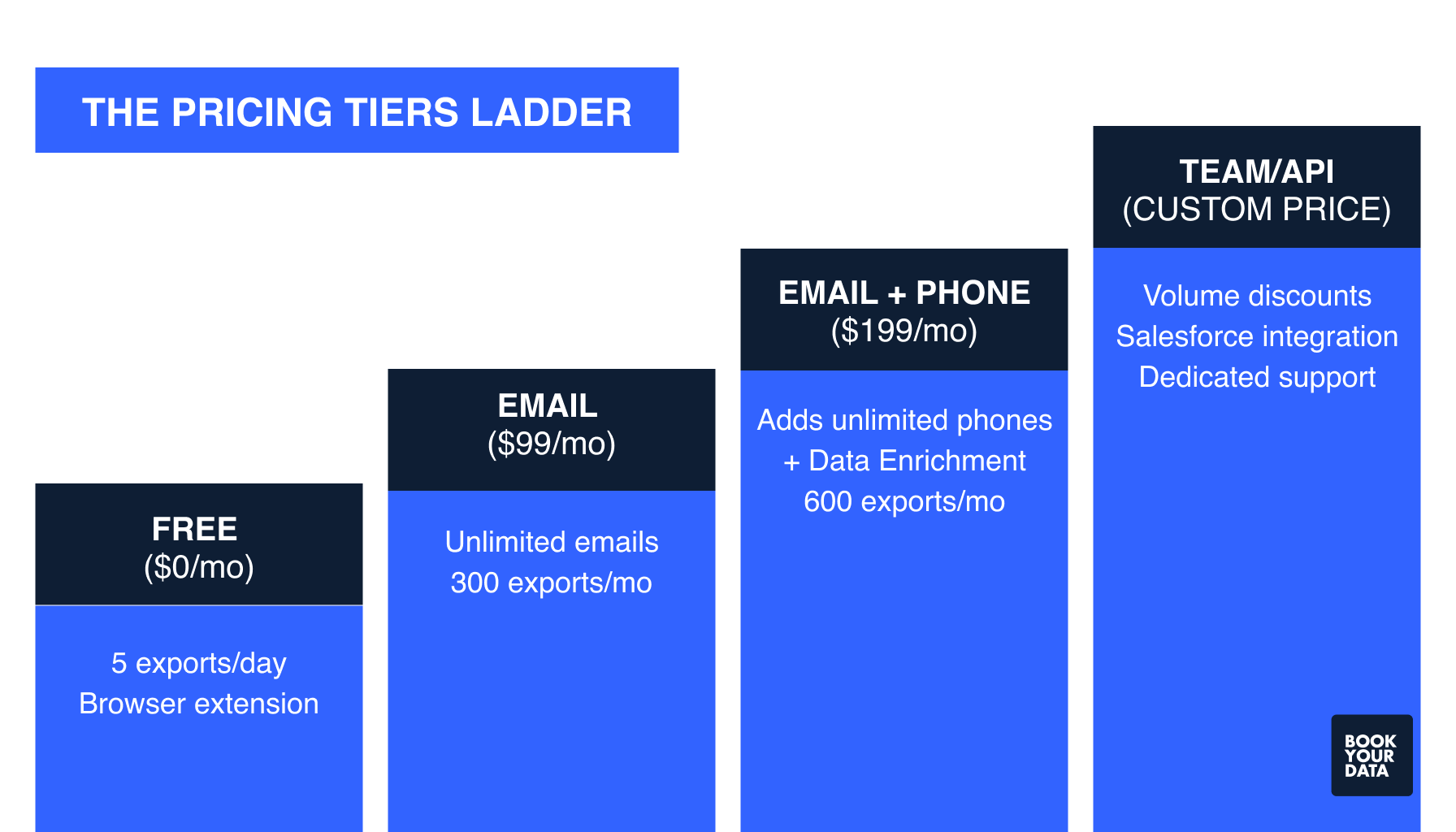
ContactOut’s Team/API plan offers features such as API access, 20% more data coverage, and a bulk license with over 700 million profiles. It integrates smoothly with Recruiter Pro, Salesforce, and ATS systems and provides advanced team management and detailed reports. Users benefit from a dedicated account manager to support their needs. ContactOut requests users to contact their sales team directly for pricing and specific details.
Best for: Revenue teams with big databases, complex funnels, or multiple tools (CRM, MAP, data warehouse) that need consistent, automated enrichment and higher usage limits.
What are the additional costs and add-ons of ContactOut?
.png)
The additional costs and add-ons of ContactOut include fair use lookup limits, per-user subscriptions, export limits, and advanced features, especially for recruitment teams and organizations that need custom plan options.
The additional costs and add-ons of ContactOut are listed below.
- Fair-use lookup limits: All ContactOut plans include fair-use restrictions, even though they are marketed as “unlimited.” Each user can typically access about 2,000 emails and 1,000 phone numbers per month, along with a daily limit of roughly 91 email lookups. Once these caps are reached, users cannot purchase additional credits and must either wait for the monthly reset or negotiate a custom plan.
- Export restrictions: ContactOut controls how many contacts users can export per period. Free plans usually allow around five exports per day, while paid plans permit approximately 300–600 exports per month, depending on the tier. There are no overage options, meaning businesses must upgrade or negotiate a custom plan if they require more exports.
- Per-user subscription costs: Each team member is required to hold their own paid subscription, which increases the total cost for organizations with larger teams. Standard plans do not include built-in volume discounts, so scaling usage across multiple recruiters or departments often requires negotiating a team or enterprise arrangement.
- Advanced features: Paid plans include enhanced search functionality, access to the Chrome extension, outreach and campaign tools for bulk messaging, and platform integrations. Higher-tier plans, such as the recruiter plan, provide larger lookup and export limits and access to recruitment-focused CRM/ATS integrations that simplify sourcing workflows.
- Recruiter-focused add-ons: Recruiter-specific features include specialized CRM and ATS integrations designed to streamline candidate tracking and bulk sourcing. These capabilities help recruitment teams manage larger pipelines more efficiently, but they are available only in higher-tier or custom plans.
- Custom enterprise/API plan costs: Organizations that need advanced support or higher usage caps can negotiate a custom API plan. This plan offers tailored monthly limits, unlimited user seats, direct API access, and priority support.
What are the user reviews of ContactOut?
The user reviews of ContactOut are mentioned below.
What is ContactOut?

ContactOut is an email finder tool that salespeople, recruiters, and marketers use to find email addresses and phone numbers of professionals, primarily from LinkedIn. It helps users quickly discover verified contact details so they can reach the right people for business or hiring purposes. ContactOut works through a simple Chrome browser extension that lets users pull email and phone information directly from LinkedIn profiles with one click.
It uses a "triple verification" system to check email validity, which lowers the chance of bounced messages and improves email outreach success. Users are allowed to build contact lists, export them as CSV files, or push them directly into their Customer Relationship Management (CRM) software for easy management. Additional features of ContactOut include a search portal to find professionals even outside LinkedIn and integration options with tools like Salesforce, HubSpot, and Zapier.
What are the features of ContactOut?
The features of ContactOut include Search Portal, Chrome Extension, API, Support, and Data Enrichment.
The features of ContactOut are mentioned below.
- Search Portal: ContactOut’s Search Portal helps you find professionals quickly by filtering things like job level, department, and technology used to make it easier to find exactly who you need among 350 million people.
- Chrome Extension: The Chrome Extension integrates with LinkedIn to help users find the most accurate emails and phone numbers fast. You can add people to email campaigns or save their information to your CRM or ATS without leaving the LinkedIn page.
- API: ContactOut offers an API so you can connect its data directly to your own software. An API token allows smooth integration and helps you automate your contact search and outreach. This is useful if you want to use ContactOut data inside your own apps or workflows.
- Support: ContactOut provides support if you want to remove or update your own information from their system. You can send an opt-out request or contact support by email and include details about any errors or privacy concerns. This helps keep the data accurate and respects privacy rights.
- Data Enrichment: Data Enrichment allows you to add verified emails and phone numbers to your existing contacts. It fills in missing information in your CRM or ATS, so you know more about each lead quickly. This is to make sure that your contact records are complete and up-to-date with the latest verified data.
Comparison of ContactOut pricing with other alternatives
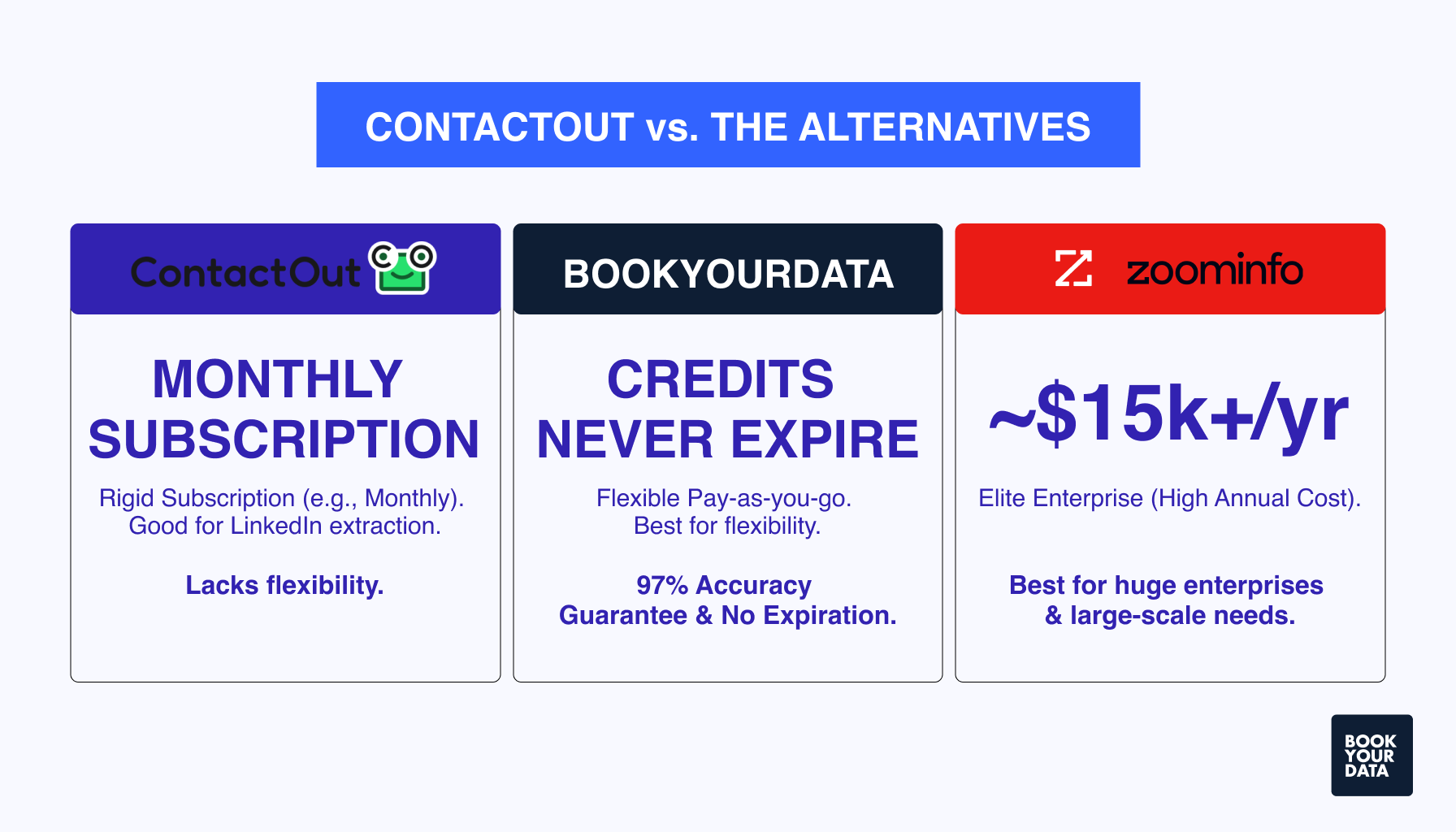
Below is a comparison table of ContactOut pricing with its other alternatives, such as Zoominfo, BookYourData, ExactData, Datanyze, Lusha, Lead411, and more.

What factors should businesses consider when choosing a ContactOut pricing plan?
Businesses should consider multiple factors when choosing a ContactOut plan, such as volume, features, collaboration, budget, support, and customization.
Estimate how many email and phone lookups your team will need each month to avoid paying for unnecessary credits. Select a plan that matches your projected usage when choosing a ContactOut plan.
Evaluate the specific features included in each plan. Determine if you require phone number lookups, email campaigns, or CRM and ATS integrations to work efficiently without needing frequent upgrades.
Consider your team size and collaboration needs next. Teams with multiple users must opt for plans that support team management, reporting, and shared access to help maintain workflow transparency and accountability across your sales or recruitment group.
Budget alignment is essential for sustainable use. Compare monthly and annual billing options, and assess whether consumption-based or flat-rate plans fit your financial strategy.
Check the data quality and coverage offered by the plan. Access to a large, verified B2B database with accurate contact details improves lead quality and campaign success.
How does ContactOut work?
ContactOut works by extracting and verifying contact details such as emails and phone numbers from online sources, especially LinkedIn. Users can access this information through a Chrome extension or a search portal, which allows quick and accurate prospecting. The platform also offers features like bulk export, email campaigns, and AI-generated hyper-personalized emails to help sales, recruitment, and marketing teams reach out to the right contacts.
Are ContactOut's "unlimited" plans really unlimited?
No, the ContactOut Unlimited plans are not truly unlimited but operate under a fair use policy. There is, for example, a credit limit of 2,000 email credits and 1,000 phone credits per account per month. It is termed as unlimited, but the usage is monitored and capped within these limits to maintain service quality and fairness for all users.
How accurate is ContactOut?
ContactOut is 99% accurate and uses a triple-layer email verification system that provides 99% confidence in the emails and phone numbers it sources. It collects data by scanning billions of web pages daily and uses AI to match and verify contact details.
How can I delete data from ContactOut?
You can delete data from ContactOut by using their online opt-out form, which requires you to find your profile URL and submit the information. Another way to delete data from ContactOut is to email their support team at [email protected].
How can ContactOut enhance your lead generation strategy?
ContactOut can enhance your lead generation strategy by providing accurate professional contact information, such as emails and phone numbers, directly from LinkedIn. It saves time by eliminating manual searching and offers a convenient Chrome extension.
Is ContactOut affordable for small businesses?
Yes, ContactOut is affordable for small businesses since it has a Free plan, an Email plan that costs $99/month, which provides up to 2,000 emails and 300 exports monthly, and is suitable for light to moderate use. The “unlimited” claims by the ContactOut sales team are subject to fair use policies and may limit actual usage.
Can I cancel my ContactOut subscription?
Yes, you can cancel your ContactOut subscription anytime before your next billing date if you are on a monthly plan, and you will retain your remaining lookups until that date. Annual subscriptions require you to cancel within the first 30 days of purchase only if you have used less than 100 credits, and you will get a refund minus one month's price.
How can I integrate ContactOut with my ATS / CRM?
You can integrate ContactOut with ATS/CRM by selecting your desired system, following login and authorization prompts. Users are allowed to save profiles found using ContactOut to their ATS/CRM with one click, and you can choose the exact folder or location for saved leads.
Is ContactOut compliant with data privacy laws?
Yes, ContactOut is compliant with data privacy laws such as GDPR (General Data Protection Regulation) and CCPA (California Consumer Privacy Act) by processing only publicly available data, which it collects from websites and social media where the information is "manifestly public." It claims a legitimate interest basis for processing data and provides users with control options such as data deletion and opting out.
How does ContactOut find sales leads?
ContactOut finds sales leads primarily by using its Chrome extension to extract email addresses and phone numbers directly from LinkedIn profiles. It provides access to a vast database of over 350 million professionals and 40 million companies, and allows targeted searches with 20+ filters such as industry and job title.
How does ContactOut help create verified email lists?
ContactOut helps create verified email lists through its triple-layer email verification system that checks email deliverability, server status, and authenticity using multiple data points. The platform’s Chrome extension scans LinkedIn profiles to extract emails, which are then verified to reduce bounce rates and increase deliverability.
Why is ContactOut effective for high-quality lead generation?
ContactOut is effective for high-quality lead generation because it uses strategies to generate high-quality email leads, such as access to a vast, accurate B2B database with triple-verified emails and phone numbers. Its Chrome extension allows smooth contact extraction from LinkedIn, while advanced filters help target the right decision-makers.
[CTA1]