16 Best Wiza Alternatives in 2026
Wiza is a B2B sales intelligence platform designed to help sales, recruiting, and marketing teams find verified contact information directly from LinkedIn. Its use cases include using its Chrome extension to find accurate contact data and bulk export prospects to CSV or directly to your CRM.
Wiza does not provide behavioral data, intent signals, and built-in outreach tools, so users look for Wiza alternatives that better suit their specific needs.
It is important to look for Wiza alternatives for businesses that need broader data coverage beyond LinkedIn, stronger compliance with regulations like GDPR and CCPA, and better scalability for high-volume outbound campaigns.

What are the best Wiza alternatives and competitors?

The best Wiza alternatives and competitors include BookYourData, Apollo.io, Lusha, PhantomBuster, Hunter.io, ZoomInfo, UpLead, Cognism, RocketReach, Kaspr, Snov.io, Evaboot, ContactOut, Skrapp.io, FindyMail, and Seamless.AI.
Best Wiza alternatives and competitors are listed below.
- BookYourData: BookYourData is a pay-per-lead B2B contact database offering a 97% email accuracy guarantee with no subscription required.
- Apollo.io: Apollo.io is an all-in-one sales intelligence platform combining a 270M+ contact database with built-in email sequencing and outreach tools.
- Lusha: Lusha is a browser extension that instantly reveals verified email addresses and phone numbers from LinkedIn profiles and company websites.
- PhantomBuster: PhantomBuster is a code-free automation tool offering 130+ Phantoms for data extraction and lead generation across multiple platforms.
- Hunter.io: Hunter.io is a domain-based email finder and verification tool with built-in cold email campaign capabilities.
- ZoomInfo: ZoomInfo is an enterprise-level sales intelligence platform with 300M+ contacts, intent data, and comprehensive go-to-market tools.
- UpLead: UpLead is a B2B lead generation platform with real-time email verification that only charges for valid contacts.
- Cognism: Cognism is a premium sales intelligence tool specializing in phone-verified mobile numbers and GDPR-compliant European data.
- RocketReach: RocketReach is a professional contact search engine with 700M+ profiles for finding emails and phone numbers across industries.
- Kaspr: Kaspr is a LinkedIn Chrome extension providing instant one-click access to prospect emails and phone numbers.
- Snov.io: Snov.io is an all-in-one cold outreach platform combining email finding, verification, and automated drip campaigns.
- Evaboot: Evaboot is a Sales Navigator scraping tool that exports clean, formatted lead data with automatic false positive detection.
- ContactOut: ContactOut is a recruiter-focused contact finder specializing in personal email addresses and triple-verified contact data.
- Skrapp.io: Skrapp.io is a simple and affordable email finding tool for LinkedIn profiles and company domain searches.
- FindyMail: FindyMail is an email verification tool designed to enrich existing lead lists with high-accuracy verified email addresses.
- Seamless.AI: Seamless.AI is an AI-powered sales prospecting platform with real-time contact verification and buyer intent signals.
BookYourData (Best for pay-as-you-go, high-accuracy B2B contact lists)

BookYourData is a B2B lead generation platform that provides pay-per-lead contact data with a guarantee on accuracy. Sales teams, marketers, and recruiters who need verified business contacts use it. The B2B platform works by allowing users to purchase pre-verified email addresses and phone numbers without requiring a subscription. BookYourData stands out for its unique pricing model, where you only pay for the leads you download.
Features
- Advanced search filters by industry, company size, location, and job title
- Bulk data export options as compared to BookYourData competitors
- Direct phone numbers and mobile numbers
- Technographic data for technology stack insights
- Chrome extension for quick access
- API access for integrations
Popular integrations
- Salesforce
- HubSpot
- Zapier
- Pipedrive
- Custom API integrations
Benefits and drawbacks
Below are the benefits and drawbacks of BookYourData.
User reviews
Below are the user reviews of BookYourData.
Pricing
- Free Pack: The Free Pack of BookYourData costs $0, gives 10 credits, and requires no subscription.
- Pay-As-You-Go Packs: The Pay-As-You-Go Packs cost $99 with $0.40
cost per contact/credit, and these credits never expire.

BookYourData vs Wiza
Here is a comparison table of BookYourData and Wiza.
Apollo.io (Best for end-to-end prospecting + AI-driven engagement)
Apollo.io is an all-in-one sales intelligence and engagement platform that combines a massive B2B database with outreach automation tools. Sales teams, SDRs, marketers, and startups of all sizes use it, and Apollo.io works by giving users access to over 270 million contacts and 60 million companies, while also providing built-in tools for email sequences, calling, and workflow automation.
Features
- Advanced search filters with over 65 filter options
- Email sequencing and automated follow-ups
- Built-in dialer for cold calling, unlike Apollo.io competitors
- LinkedIn extension for quick prospecting
- Apollo.io Chrome extension
Popular Integrations
- Salesforce
- HubSpot
- Outreach
- LinkedIn Sales Navigator
Benefits and drawbacks
The benefits and drawbacks of Apollo.io are mentioned below.
User reviews
Below are the user reviews of Apollo.io.
Pricing
The pricing plans of Apollo.io are listed below.
- Free plan: Apollo.io’s free plan costs $0 and gives 100 credits per month.
- Basic plan: The Basic plan of Apollo.io offers 2,500 credits per user for $59 per month if it is billed monthly.
- Professional plan: The Professional plan of Apollo.io offers 4,000 credits per user for $99 per month if billed monthly.
- Organization plan: The Organization plan of Apollo.io offers 6,000 credits per user for $149 per month if billed monthly.
Apollo.io vs Wiza
Here is a comparison table of Apollo.io and Wiza.
Lusha (Best for fast, compliant global contact enrichment)
Lusha is a B2B contact data platform that helps sales and recruitment professionals find accurate email addresses and phone numbers for their prospects. Sales representatives, recruiters, and marketing teams across companies of all sizes use it, and Lusha works through a simple browser extension that reveals contact details while browsing LinkedIn profiles or company websites.
Features
- Prospecting dashboard with advanced filters
- Bulk enrichment and list building
- Better team management and credit sharing as compared to Lusha competitors
- Job change alerts and notifications
Popular integrations
- Salesforce
- HubSpot
- Outreach
- Pipedrive
Benefits and drawbacks
The benefits and drawbacks of Lusha are mentioned below.
User reviews
Below are the user reviews of Lusha.
Pricing
The pricing plans of Lusha are listed below.
- Free plan: The Free plan of Lusha costs $0 and offers 40 credits per month.
- Pro plan: The Pro plan of Lusha costs $29.90 per month if billed monthly and offers 250 credits.
- Premium plan: The Premium plan of Lusha costs $69.90 per month if billed monthly and offers 600 credits.
- Scale plan: The Scale plan of Lusha has custom pricing and offers custom credits.
Lusha vs Wiza
Here is a comparison table of Lusha and Wiza.
PhantomBuster (Best for automation & scraping of live social signals)
PhantomBuster is a real-time sales prospecting tool that extracts data directly to a CRM or database from any source on the internet, such as LinkedIn, Sales Navigator, Instagram, Twitter, and Google. It offers over 130 ready-made automations across 15+ platforms, requires no coding skills to set up and use, runs 24/7 in the cloud without manual monitoring, and allows multiple Phantoms to be chained into complex workflows for efficient lead generation.
Features
- Flows for multi-step lead generation sequences
- LinkedIn profile scraping and messaging automation
- Email discovery and data enrichment
- Chrome extension for browser-based extraction
Popular integrations
- HubSpot
- Salesforce
- Google Sheets
- Zapier
Benefits and drawbacks
The benefits and drawbacks of PhantomBuster are mentioned below.
User reviews
Below are the user reviews of PhantomBuster.
Pricing
The pricing plans of PhantomBuster are listed below.
- Trial plan: The Trial plan costs $0 and offers 1k AI credits, 100 URL finder credits, and 5 slots for Phantoms.
- Starter plan: The Starter plan costs $69/month if billed monthly and $56/month if billed annually. It offers 10k/month AI credits and 1k/month URL finder credits.
- Pro plan: The Pro plan costs $159/month if billed monthly and $128/month if billed annually. It offers 30k/month AI credits and 10k/month URL finder credits.
- Team plan: The Team plan costs $439/month if billed monthly and $352/month if billed yearly. It offers 90k/month AI credits and 20k/month URL finder credits.
PhantomBuster vs Wiza
Here is a comparison table of PhantomBuster and Wiza.
Hunter.io (Best for trusted email discovery + verifier)
Hunter.io is an email finding and verification platform designed to help professionals discover and validate business email addresses. Hunter.io vs. Apollo.io comparison shows that Hunter.io allows users to search for email addresses associated with any company domain or find the email of a specific person by entering their name and company. The platform crawls the web to index publicly available email addresses and uses pattern recognition to suggest the most likely email format for any organization.
Features
- Domain search to find all emails at a company
- Email finder for individual contact lookup
- Bulk email finding and verification
- Email verification tool to check deliverability
- Hunter.io Chrome extension
Popular integrations
- Salesforce
- HubSpot
- Pipedrive
- Zoho CRM
Benefits and drawbacks
Below are the benefits and drawbacks of Hunter.io.
User reviews
Below are the user reviews of Hunter.io.
Pricing
The pricing plans of Hunter.io are listed below.
- Free plan: The Free plan of Hunter.io provides 50 credits per month and costs $0.
- Starter plan: The Starter plan of Hunter.io provides 2,000 credits and costs $49 per month if billed monthly.
- Growth plan: The Growth plan of Hunter.io provides 10,000 credits and costs $149 per month if billed monthly.
- Scale plan: The Scale plan of Hunter.io provides 25,000 credits and costs $299 per month when billed monthly.
- Enterprise plan: The Enterprise plan of Hunter.io has a custom number of credits and customized pricing.
Hunter.io vs Wiza
Below is a comparison table of Hunter.io and Wiza.
ZoomInfo (Best for enterprise-grade company intelligence & buying signals)
ZoomInfo is an enterprise-level B2B sales intelligence platform that provides comprehensive company and contact data for sales, marketing, and recruiting teams. ZoomInfo is a legit tool and it works by maintaining a massive database of over 300 million professional profiles and 100 million company records, continuously updated through AI-driven data collection and human verification. The platform also offers intent data, organizational charts, technographic insights, and workflow automation tools.
Features
- Advanced company and contact search with 300+ filters
- Buyer intent signals and website visitor tracking
- Organizational charts and reporting hierarchies, like ZoomInfo competitors
- Technographic data showing technology stack information
Popular integrations
- Salesforce
- HubSpot
- Microsoft Dynamics
- Outreach
Benefits and drawbacks
Here are the benefits and drawbacks of ZoomInfo.
User reviews
The Below table shows the user reviews of ZoomInfo.
Pricing
The pricing plans of ZoomInfo are listed below.
- Lite plan: The Lite plan of ZoomInfo costs $0 and is accessible by filling out a form.
- Professional plan: The Professional plan costs $14,999 annually with 5,000 annual bulk credits.
- Advanced plan: The Advanced plan costs $24,995 per year with 10,000 annual bulk credits.
- Elite plan: The Elite plan of ZoomInfo pricing costs $39,995 per year, with 10,000 annual bulk credits.
ZoomInfo vs Wiza
Here is a comparison table of ZoomInfo and Wiza.
UpLead (Best for 95%-accurate, real-time verified B2B contact data)
UpLead is a B2B lead generation platform that provides real-time verified contact and company data for sales and marketing professionals. It offers access to a database of over 160 million contacts with real-time email verification at the point of export, and makes sure that users only pay for valid and deliverable data, unlike other UpLead competitors.
Features
- Real-time email verification before download
- Company news and alerts for timely outreach
- Technographic data to filter by technology stack
- Chrome extension for LinkedIn prospecting
Popular integrations
- Salesforce
- HubSpot
- Pipedrive
- Zoho CRM
Benefits and drawbacks
Here are the benefits and drawbacks of UpLead.
User reviews
Here are the user reviews of UpLead.
Pricing
The pricing plans of UpLead are listed below.
- Free trial: The Free trial of UpLead costs $0 and offers 5 credits for 7 days.
- Essentials plan: The Essentials plan costs $99 per month, 170 credits, and verified emails.
- Plus plan: The Plus plan costs $199 per month, 400 credits, and advanced filters.
- Professional plan: UpLead’s Professional plan has custom pricing and a number of credits, and a dedicated success manager handles your account.
UpLead vs Wiza
Here is a comparison table of UpLead and Wiza.
Cognism (Best for GDPR-compliant, enterprise-grade sales intelligence)
Cognism is a premium B2B sales intelligence platform that specializes in providing phone-verified mobile numbers and compliant contact data for sales and revenue teams. Mid-market and enterprise companies across Europe and North America use it, and Cognism works by combining AI-powered data collection with human verification to deliver highly accurate direct dial numbers through its proprietary Diamond Data feature.
Features
- Diamond Data phone-verified mobile numbers
- Advanced company and contact search filters
- Unrestricted access to person and company data
- Contextual data, including job changes and hiring signals
Popular integrations
- Salesforce
- HubSpot
- Outreach
- Microsoft Dynamics
Benefits and drawbacks
The benefits and drawbacks of Cognism are mentioned below.
User reviews
The user reviews of Cognism are mentioned below.
Pricing
The pricing plans of Cognism are listed below.
- Grow plan: Cognism’s pricing for the Grow plan provides demographic and firmographic data with custom pricing.
- Elevate plan: This B2B prospecting tool also has an Elevate plan that offers signals data, and add-ons are also available with custom pricing.
Cognism vs Wiza
Here is a comparison table of Cognism and Wiza.
RocketReach (Best for cross-platform contact discovery (emails + phones))
RocketReach is a professional contact search engine that helps users find email addresses and phone numbers for professionals across various industries. RocketReach is a legit tool and it works by aggregating data from multiple public sources to provide contact information for over 700 million professionals and 35 million companies. The platform offers better individual lookups and bulk search capabilities as compared to RocketReach alternatives.
Features
- People and company search engine
- Email and phone number lookup
- Advanced filters by title, location, industry, and company size
- API access for custom integrations
Popular integrations
- Salesforce
- HubSpot
- Zapier
- Outreach
Benefits and drawbacks
The benefits and drawbacks of RocketReach are mentioned below.
User reviews
The user reviews of RocketReach are mentioned below.
Pricing
The pricing plans of RocketReach are listed below.
- Essentials plan: The Essentials plan of RocketReach costs $27 per month with unlimited personal and work emails.
- Pro plan: The Pro plan of RocketReach costs $69 per month with unlimited mobile and direct phone numbers.
- Ultimate plan: The Ultimate plan of RocketReach costs $175 per month with Autopilot and 25 active jobs.
RocketReach vs Wiza
Here is a comparison table of RocketReach and Wiza.
Kaspr (Best for instant LinkedIn contact reveals)
Kaspr is a LinkedIn-focused prospecting tool that provides instant access to email addresses and phone numbers directly from LinkedIn profiles. It works through a Chrome extension that reveals contact information while browsing LinkedIn profiles, company pages, or Sales Navigator searches. The platform emphasizes speed and simplicity, and allows users to extract contact data with a single click and automatically sync it to their CRM.
Features
- Chrome extension for LinkedIn contact extraction
- Email and phone number lookup
- Bulk extraction from LinkedIn searches and lists
- Automated data enrichment
Popular integrations
- Salesforce
- HubSpot
- Pipedrive
- Lemlist
Benefits and drawbacks
The benefits and drawbacks of Kaspr are mentioned below.
User reviews
The user reviews of Kaspr are mentioned below.
Pricing
- Free plan: The Free plan of Kaspr costs €0 per month and offers the Kaspr Chrome extension.
- Starter: The Starter plan of Kaspr costs €45 per month and €59 per month when billed yearly and offers the Kaspr Sales Navigator.
- Business: The Business plan of Kaspr costs €79 per month and €99 per month when billed yearly and offers API access.
- Enterprise: The Enterprise plan of Kaspr has customized pricing, and you need to talk to the sales team to get a plan.
Kaspr vs Wiza
Here is a comparison table of Kaspr and Wiza.
Snov.io (Best for instant LinkedIn contact reveals)
Snov.io is an all-in-one sales automation platform that combines email finding, verification, and outreach tools for lead generation. It works by allowing users to find email addresses through domain search, company lookup, or LinkedIn prospecting, then verify those emails and launch automated drip campaigns directly from the platform.
Features
- Email finder by domain, company, or name
- Bulk email verification tool like Snov.io competitors
- Chrome extension for LinkedIn and web prospecting
- Email drip campaigns with personalization
Popular integrations
- Salesforce
- HubSpot
- Pipedrive
- Zapier
Benefits and drawbacks
The benefits and drawbacks of Snov.io are mentioned below.
User reviews
The user reviews of Snov.io are mentioned below.
Pricing
The pricing plans of Snov.io are listed below.
- Starter plan: The Starter plan of Snov.io costs $39 per month with 1,000 credits, 5000 recipients, 3 mailbox warmups, and unlimited monthly emails.
- Pro plan: The Pro plan of Snov.io costs $99 per month with 5,000 credits, 2500 recipients, unlimited mailbox warmups, and unlimited monthly emails.
- Custom Ultra plan: The Custom Ultra has customized pricing and includes 200,000 credits, 400,000 recipients, unlimited warmups, and unlimited monthly emails.
Snov.io vs Wiza
Here is a comparison table of Snov.io and Wiza.
Evaboot (Best for clean and reliable LinkedIn Sales Navigator list exports)
Evaboot is a LinkedIn Sales Navigator scraping tool that helps users extract clean and verified lead data from their Sales Navigator searches. The platform is designed specifically for Sales Navigator users who want to quickly build accurate prospect lists without manual data cleaning or formatting work.
Features
- Sales Navigator list and search export
- Automatic data cleaning and formatting
- Email finder with built-in verification
- False positive detection to improve list accuracy
Popular integrations
- Salesforce
- HubSpot
- Lemlist
- Outreach
Benefits and drawbacks
The benefits and drawbacks of Evaboot are mentioned below.
User reviews
The user reviews of Evaboot are mentioned below.
Pricing
- Monthly plan: The monthly plan costs $9/month and includes Sales Navigator Export and Email Finder. Plans are based on “credits per month,” with available credit tiers of 100, 500, 1.5k, 4k, 8k, 20k, 50k, 100k, and 200k credits per month. Each credit can be used for exporting a lead/account, finding and verifying an email, or verifying a phone number.
- Yearly plan: The yearly plan costs $8/month (billed annually) and includes the same Sales Navigator Export and Email Finder features. Plans are also based on “credits per month,” with the same available credit tiers of 100, 500, 1.5k, 4k, 8k, 20k, 50k, 100k, and 2200k credits per month, which allow users to save approximately two months’ cost compared to the monthly plan.
Evaboot vs Wiza
Here is a comparison table of Evaboot and Wiza.
ContactOut (Best for recruiter-grade LinkedIn personal + work emails)
ContactOut is a contact finding platform designed primarily for recruiters and sales professionals who need to find personal email addresses and phone numbers. It works through a Chrome extension that overlays contact information directly on LinkedIn profiles, and reveals personal and work emails along with phone numbers.
Features
- Chrome extension for LinkedIn profile lookups
- Personal and work email discovery
- Phone number finder provides mobile numbers
- Search portal for prospecting outside LinkedIn
Popular integrations
- Salesforce
- HubSpot
- Lever
- Greenhouse
Benefits and drawbacks
The benefits and drawbacks of ContactOut are mentioned below.
User reviews
The user reviews of ContactOut are mentioned below.
Pricing
The pricing plans of ContactOut are listed below.
- Free plan: The Free plan costs $0 with only 5 exports per day.
- Email plan: The Email plan costs $25 per month with 300 exports.
- Email+Phone plan: The Email+Phone plan costs $49 per month with 600 exports.
- Team API plan: The Team API plan has customized pricing and offers a dedicated account manager.
ContactOut vs Wiza
Here is a comparison table of ContactOut and Wiza.
Skrapp.io (Best for extracting verified business emails from LinkedIn with bulk and CRM-friendly workflows)
Skrapp.io is an email finding and verification tool that helps sales and marketing professionals discover business email addresses from LinkedIn profiles and company domains. The tool focuses on simplicity and affordability, and offers straightforward email lookup capabilities without the complexity of larger all-in-one platforms.
Features
- Chrome extension for LinkedIn email extraction
- Domain search to find emails at any company
- Bulk email finder for large list building
- Email verification tool
Popular integrations
- Salesforce
- HubSpot
- Zoho CRM
- Pipedrive
Benefits and drawbacks
The benefits and drawbacks of Skrapp.io are mentioned below.
User reviews
The user reviews of Skrapp.io are mentioned below.
Pricing
The pricing plans of Skrapp.io are listed below.
- Free plan: The Free plan costs $0 and offers email finder, LinkedIn recruiter, and restricted companies research.
- Professional plan: The Professional plan costs $26/month if billed monthly and $14/month if billed yearly, and offers LinkedIn Multi-Page Enrichment, unlimited leads search, and list CRM sync.
- Enterprise plan: The Enterprise plan costs $234/month if billed monthly and $118/month if billed yearly, offers API integration, accelerated support, and a dedicated account manager.
Skrapp.io vs Wiza
Here is a comparison table of Skrapp.io and Wiza.
FindyMail (Best for pay-for-verified emails with guaranteed low bounce rates)
FindyMail is an email finding and verification tool built specifically for users who export leads from LinkedIn Sales Navigator and other prospecting tools. It works by taking exported lead lists and finding verified email addresses for each contact using multiple data sources and verification layers.
Features
- Email finder for existing lead lists
- Multi-layer email verification
- Bulk email lookup and processing
- Direct integration with Sales Navigator export tools
Popular integrations
- Evaboot
- PhantomBuster
- Clay
- Zapier
Benefits and drawbacks
The benefits and drawbacks of FindyMail are mentioned below.
User reviews
The user reviews of FindyMail are mentioned below.
Pricing
The pricing plans of Findymail are listed below.
- Trial plan: The Trial plan costs $0 and offers API access and 10 finder credits.
- Basic plan: The Basic plan costs $49 per month and offers 1000 finder credits with 1000 verifier credits.
- Starter plan: The Starter plan costs $99 per month and offers 5000 finder credits.
- Business plan: The Business plan costs $249 per month and offers 15,000 finder credits.
- Business Plus: The Business Plus plan costs $399 per month if billed monthly and provides 30,000 finder and 30,000 verifier credits.
- Scale: The Scale plan costs $549 per month if billed monthly and provides 50,000 finder and 50,000 verifier credits. This plan costs $849 which provides 100,000 credits.
- Enterprise: This is a custom plan which offers custom pricing, automatic refill, priority support, and a dedicated account manager.
FindyMail vs Wiza
Here is a comparison table of FindyMail and Wiza.
Seamless.AI (Best for real-time, AI-powered prospecting & unlimited leads)
Seamless.AI is an AI-powered sales intelligence platform that provides real-time contact and company data for B2B sales prospecting. The platform offers a search engine approach where users can find decision-makers by job title, company, industry, and other criteria, with the AI verifying emails and phone numbers at the moment of lookup.
Features
- Real-time contact search and verification
- AI-powered email and phone number finder
- Buyer intent signals
- Pitch intelligence and company insights
Popular integrations
- Salesforce
- HubSpot
- Outreach
- Microsoft Dynamics
Benefits and drawbacks
The benefits and drawbacks of Seamless.AI are mentioned below.
User reviews
The user reviews of Seamless.AI are mentioned below.
Pricing
The pricing plans of Seamless.AI are listed below.
- Free plan: The Free plan of Seamless.AI costs $0 and provides email addresses and phone numbers while maintaining compliance.
- Pro plan: The Pro plan has custom pricing and a daily refresh, along with a free admin seat and an AI assistant.
- Enterprise plan: The Enterprise plan offers custom pricing, credits, API access, and phone support.
Seamless.AI vs Wiza
Here is a comparison table of Seamless.AI and Wiza.
What is Wiza?
Wiza is a sales prospecting and engagement platform that helps sales teams find and export verified contact information from LinkedIn. This tool works by connecting to LinkedIn Sales Navigator and allows users to search for prospects and then extract their email addresses and phone numbers in bulk. The platform integrates with popular CRMs like Salesforce and HubSpot, to allow users push their leads directly into your existing workflow. Wiza operates on a credit-based pricing model where each verified contact costs a certain number of credits.
What are the advantages of Wiza?
The advantages of using Wiza are listed below.
- Saves time and effort: Wiza helps to save time and effort by automating contact extraction from LinkedIn, letting sales teams focus on selling rather than manual data entry.
- Real-time email verification: Real-time email verification reduces bounce rates and improves campaign performance by ensuring you only get valid contact information.
- Smooth CRM integration: Wiza smoothly integrates with platforms like Salesforce, HubSpot, and Pipedrive and allows automatic syncing of leads without manual data entry.
- Pay only for valid emails: Wiza has a transparent pricing and no hidden costs, so you never waste money on unusable data.
- Easy to use interface: Wiza has an easy-to-use interface which makes navigation simple even for users without much technical expertise.
What are the disadvantages of Wiza?
The disadvantages of using Wiza are listed below.
- Higher cost compared to competitors: The B2B sales intelligence platform has a higher cost compared to competitors, which makes Wiza expensive for smaller teams and startups with limited budgets.
- Requires LinkedIn Sales Navigator: Wiza users who want to access full features need a LinkedIn Sales Navigato,r as a regular free LinkedIn account restricts functionality.
- Limited free trial: The Free trial is limited and only offers 20 credits, which may not be enough to properly evaluate and understand the platform before committing.
- Subscription management issues: Several users have reported subscription management issues, such as problems around auto-renewals and difficulties canceling or changing subscriptions.
- No API available: Wiza does not contain an API, which limits integration options for businesses that want to build custom workflows or automations.
Comparison table of advantages and disadvantages of Wiza
What are the pricing plans of Wiza?
The pricing plans of Wiza include Free, Starter, Email, and Email+Phone. Below are mentioned the prices and their features.
What do users say about Wiza?
The user reviews of Wiza are mentioned below.
How to choose the right Wiza alternative?
To choose the right Wiza alternative, consider data accuracy, pricing model, database size and coverage, CRM integrations, compliance standards, and customer support.
Evaluate data accuracy as bad data leads to wasted resources, failed campaigns, and a damaged sender reputation. Ask about verification methods, including whether providers use AI, real-time email verification, and human verification, and always request a data sample to test before committing.
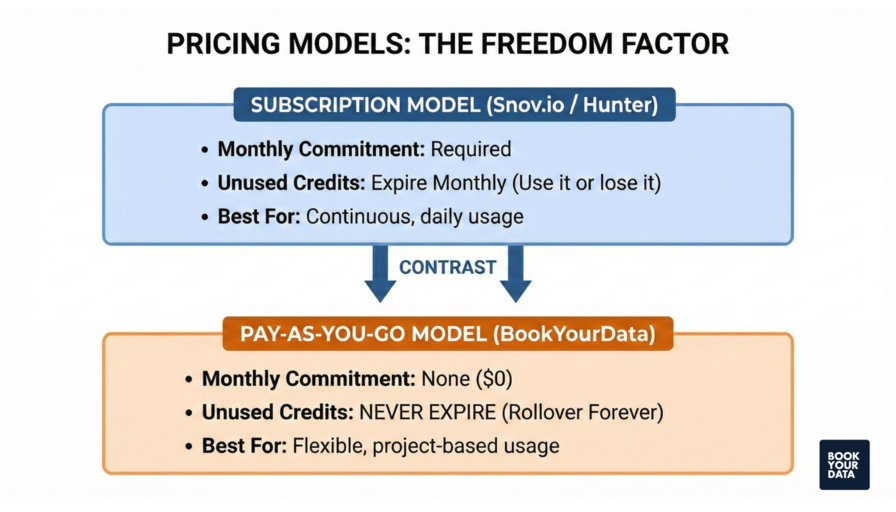
Analyze pricing models carefully since they directly impact your budget and ROI. Choose between subscription-based plans with monthly credits, pay-as-you-go models, or tiered pricing structures based on your prospecting volume and frequency of use.
Select a provider with extensive database coverage that matches your target market, including the number of B2B contacts, global reach across different countries, and availability of both email addresses and phone numbers. Consider whether the platform covers your specific industries and geographic regions adequately.
Prioritize tools that offer integrations with your existing CRM systems and marketing automation platforms. Make sure the tool integrates with your preferred CRM and other tech stacks to enhance rather than disrupt your current systems.
Verify that the provider's data complies with privacy regulations such as GDPR and CCPA to protect your business from legal consequences. Check for compliance certifications and transparent data collection practices before making your decision.
Confirm that the provider offers dedicated support through multiple channels, including email, live chat, phone, and an extensive knowledge base. Look for platforms that provide a dedicated customer success manager to help you maximize the value of the tool and resolve issues quickly.
Is Wiza safe to use for LinkedIn lead generation?
Yes, Wiza is safe to use for LinkedIn lead generation as it complies with LinkedIn’s data policies and focuses on email extraction rather than automated scraping or messaging. The strategies to generate LinkedIn leads are optimizing your LinkedIn profile, creating and sharing valuable content, using LinkedIn groups, sending personalized connection requests, and publishing LinkedIn requests.
How does Wiza work with LinkedIn Sales Navigator?
Wiza works with LinkedIn Sales Navigator through a Chrome extension that integrates directly into your Sales Navigator interface. Wiza allows you to export those prospects with a single click when you build a lead list and automatically extracts profile data and finds verified email addresses for each contact.
Does Wiza verify email accuracy in real time?
Yes, Wiza verifies email accuracy in real time by finding contact information in real time, and never relies on potentially stale company, job title, or email data. Wiza provides verified email lists, finds the email address and performs a live SMTP verification to maintain accuracy every time you request a record.
How accurate is Wiza’s contact database?
Wiza's contact database delivers high accuracy rates through its real-time verification approach. It reports 99% email accuracy, 97% job title accuracy, and less than 1% bounce rates. The tool also provides access to a B2B contact database of 850M+ total contacts, 665M+ work emails, 180M+ mobile numbers, and 190M+ personal emails.
Which Wiza competitor provide phone numbers and direct dials?
The Wiza competitor that provides phone numbers and direct dials include BookYourData, which offers verified phone numbers, mobile and direct dials with high accuracy. It aggregates data from multiple sources, validates phone numbers list in real-time, and ensures deliverability for sales and marketing campaigns
Which is the better Wiza alternative: BookYourData or Apollo.io?
BookYourData is the better Wiza alternative when comparing it to Apollo.io, as BookYourData vs. Apollo.io comparison shows that BookYourData clearly leads in data quality with a 97% accuracy guarantee, while Apollo.io offers a larger contact database, but its accuracy is not clearly stated, and some users report outdated info.
What are the best lead generation tools for B2B in 2026?
The best lead generation tools for B2B in 2026 are BookYourData for targeted leads with a 97% accuracy, ZoomInfo for detailed B2B database with intent data. HubSpot is for all-in-one CRM and marketing automation, while Apollo.io excels at sales intelligence and outreach automation.
What are the best practices for LinkedIn prospecting?
The best practices for LinkedIn prospecting include defining your Ideal Customer Profile (ICP) and Buyer Persona to focus your outreach on the most promising leads. Use LinkedIn Sales Navigator for advanced filters and better targeting, and never pitch in your first message. Crafting LinkedIn connect messages include maintaining a consistent outreach of 20-30 quality prospects daily, and tracking metrics like connection acceptance rate, response rate, and conversion to focus on results that impact your business goals.
What are the current B2B marketing trends powered by Wiza?
The current B2B marketing trends powered by Wiza include AI-driven real-time contact sourcing that uses LinkedIn to maintain accuracy regarding where someone is employed at any given moment and automated data enrichment that allows teams to scale 1:1 outreach for ABM programs by enriching contact data at target accounts in just a few clicks.
[CTA1]